Universal web search: give any model the web, on any endpoint
By Jose Sabater -
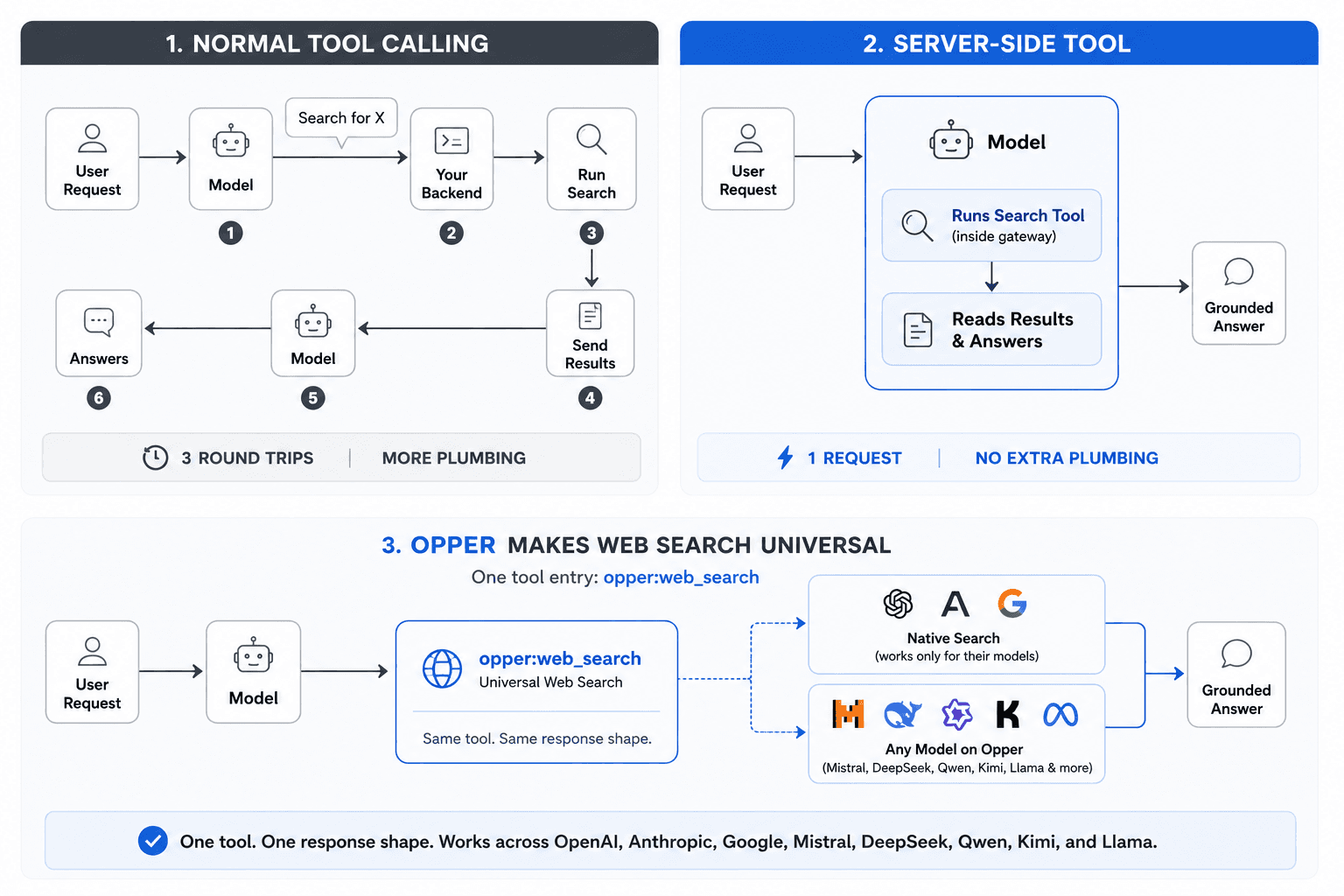
Ask a model what happened in the news today and it shrugs. Its knowledge stops at training time. Web search fixes that, and until now you had two ways to get it: use one of the big labs' own models with their built-in search, or wire up the search loop yourself. Run the model, catch its "search for X" request, call a search API, feed the results back, loop until it's done.
Not anymore. One tool now gives any model on Opper live access to the web, on any endpoint, behind a single gateway or router, from any provider. Add search to a model that never had it, or switch models without touching your search code. No loop to orchestrate.
What is a server-side tool?
A normal tool call bounces back to you. The model says "search for X", your code runs the search, you send the results back, the model continues. Three round trips, all your plumbing.
A server-side tool skips that. The model runs the tool on the gateway during the same request, reads the results, and answers. You send one request and get a grounded answer back. No extra plumbing on your side. (More on server-side tools →)
| Approach | Requests | Orchestration |
|---|---|---|
| Traditional tool calling (function calling) | Many | You build the loop |
| Server-side web search | One | None |
Web search is the obvious one. Anthropic, OpenAI and Google all ship it this way. Through Opper, those native tools just work: send them in their provider shape and we forward them verbatim.
But native search only exists for the lab's own models. Reach for Mistral, DeepSeek, Qwen, Kimi or Llama and the web disappears.
So we built universal web search. One tool entry, opper:web_search, gives any model on Opper the ability to search, native tool or not. Same tool, same response shape, every endpoint. The engines, where each one runs and the setup per model are on the web search tool page.
Only on Opper: Opper is the only gateway where web search can run fully in the EU. Our engine uses Jina, EU-hosted, so your query and every page it fetches stay on European infrastructure. Nothing leaves the EU.
One tool, every endpoint
It's the same opper:web_search entry on every compatibility surface. Point your existing SDK at Opper, drop in the tool, done. Citations come back in the exact shape your endpoint already speaks, so nothing else in your code changes.
# Chat Completions (OpenAI shape). Mistral has no native search; Opper gives it one.
curl https://api.opper.ai/v3/compat/chat/completions \
  -H "Authorization: Bearer $OPPER_API_KEY" -H "Content-Type: application/json" \
  -d '{"model":"mistral/mistral-large-latest",
       "messages":[{"role":"user","content":"What changed in the latest Go release?"}],
       "tools":[{"type":"opper:web_search","engine":"auto","max_results":3}]}'
That last one is an OpenAI-compatible web search call: the standard Chat Completions shape, one extra tool entry, and a model that has no native search of its own.
Which models support web search?
Opper serves hundreds of models from every major maker, and opper:web_search works across all of them. A handful ship their own native search: Claude, GPT, Gemini and Grok. Most don't: Mistral, DeepSeek, Qwen, Kimi, Llama, MiniMax, GLM and the rest. Through Opper they all get web search from the same tool, so "Does Mistral support web search?" and "Is there a Llama search API?" both have the same answer: yes, on Opper.
Switching models is a one-line change. The tool entry and the response shape stay identical, so web search for any LLM behaves the same whether or not the provider ships its own. Browse the full lineup in the model catalog or compare models side by side.
Already routing through an LLM gateway or router? Most stop short here. Other routers bolt search on too (OpenRouter ships an :online web plugin), but it runs every query through a US-based search engine and only reaches some models. On Opper, opper:web_search covers every model on one tool, and you can pin an EU-hosted engine so the search itself stays in Europe. (Opper vs OpenRouter →)
You pick the engine
The engine field decides how the search runs:
auto(default): use the model's native search when it has one, fall back to Opper's engine otherwise.native: require the provider's native tool. Errors if the model has none.opper: always use Opper's engine, for a uniform shape across every model.jina/exa: pin Opper's engine to a specific backend.
So the same prompt can run three ways. Here's native Claude search direct, then the same search through Opper, then forced onto Opper's EU-hosted backend.
# 1) Native Anthropic web search. Only Claude can do this.
curl https://api.anthropic.com/v1/messages \
  -H "x-api-key: $ANTHROPIC_API_KEY" -H "anthropic-version: 2023-06-01" \
  -H "Content-Type: application/json" \
  -d '{"model":"claude-sonnet-4-6","max_tokens":1024,
       "messages":[{"role":"user","content":"Top AI headlines this week?"}],
       "tools":[{"type":"web_search_20250305","name":"web_search","max_uses":3}]}'

# 2) Same search through Opper. engine "auto" routes to Claude's native tool.
curl https://api.opper.ai/v3/compat/v1/messages \
  -H "Authorization: Bearer $OPPER_API_KEY" -H "Content-Type: application/json" \
  -d '{"model":"anthropic/claude-sonnet-4-6","max_tokens":1024,
       "messages":[{"role":"user","content":"Top AI headlines this week?"}],
       "tools":[{"type":"opper:web_search","engine":"auto"}]}'

# 3) Override the engine. Force Opper's EU-hosted Jina backend, even on Claude.
curl https://api.opper.ai/v3/compat/v1/messages \
  -H "Authorization: Bearer $OPPER_API_KEY" -H "Content-Type: application/json" \
  -d '{"model":"anthropic/claude-sonnet-4-6","max_tokens":1024,
       "messages":[{"role":"user","content":"Top AI headlines this week?"}],
       "tools":[{"type":"opper:web_search","engine":"jina","max_results":3}]}'
Today Opper's engine runs on Jina (EU-hosted, all processing stays in the EU) and Exa (neural, semantic search). More backends are on the way, and you'll always be able to pin the one you want.
GDPR-compliant, EU-hosted, fully sovereign
This is where Opper stands apart. Most gateways can say "we have web search." Very few can say the search runs entirely in the EU. With the Jina backend, the query and every page fetched stay on European infrastructure, which keeps web search GDPR-compliant by default and removes the cross-border transfer that US-hosted search engines introduce.
EU-hosted is the default. Some teams need to go further. For governments and privacy-first enterprises, Opper can also run on evroc, a European sovereign cloud. Your models, the gateway, and search all sit on sovereign EU infrastructure, end to end. Nothing touches a US-controlled provider at any point, so the whole stack is genuinely European AI infrastructure. See the security overview, or talk to us if that's you.
It's all in the trace
Every search shows up in your trace as a server_side_tool step: the query, the results it pulled, and the cost, nested right under the turn that requested it. No black box.
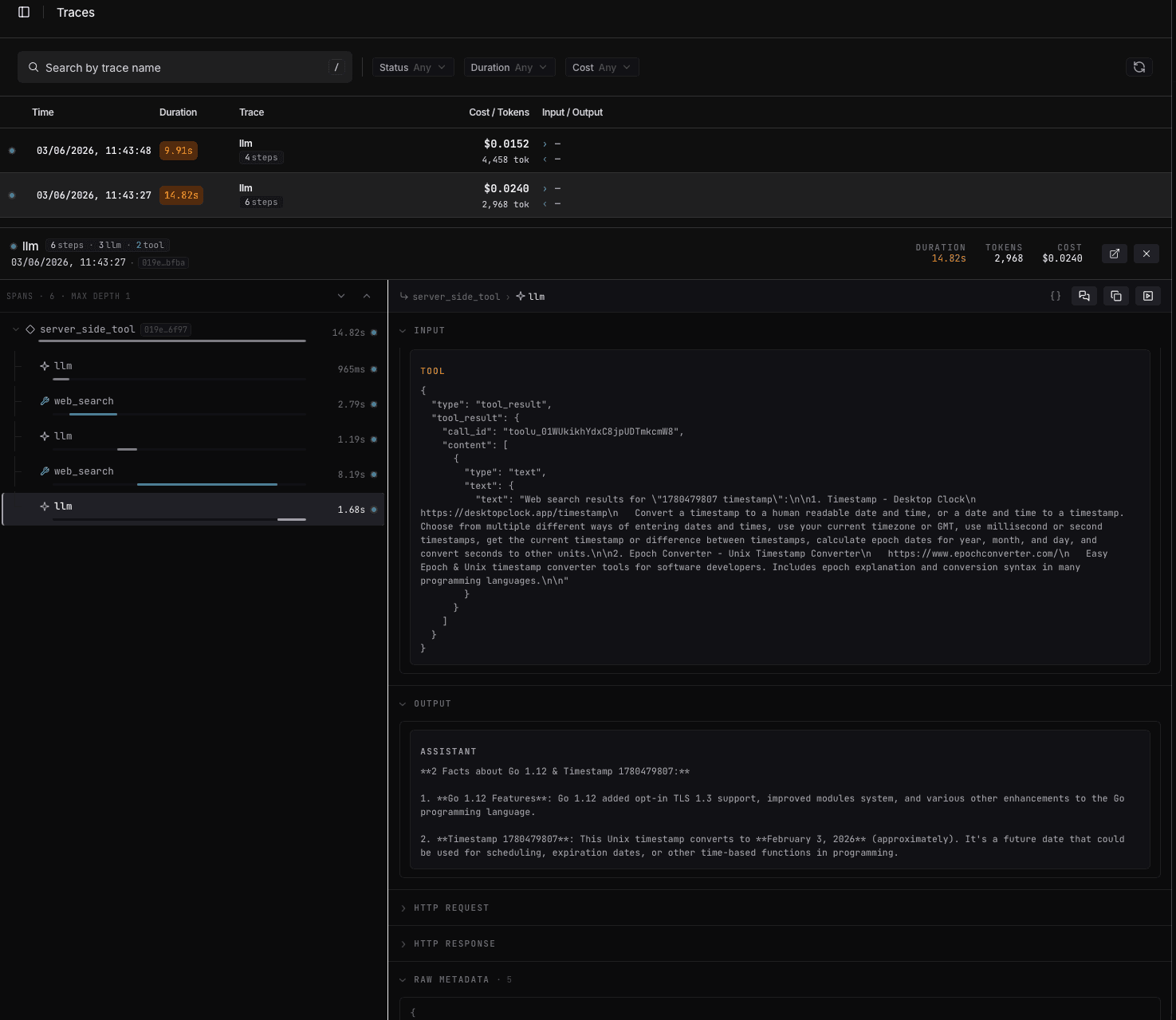
Per-search cost is itemized in the response under usage.opper.cost.tools.web_search, so it's never a surprise.
Web search FAQ
Which AI models support web search through Opper?+
All of them. Claude, GPT, Gemini and Grok ship native search; Mistral, DeepSeek, Qwen, Kimi, Llama, MiniMax and GLM don't. Through Opper, every one of them searches the web with the single opper:web_search tool, native search or not.
Can Mistral search the web?+
Yes, through Opper. Mistral has no native search tool of its own, but opper:web_search gives it one. The same goes for DeepSeek, Qwen, Kimi, Llama and the other open-weight models.
Is there a web search API for DeepSeek, Qwen or Grok?+
Yes. On Opper, DeepSeek, Qwen, Kimi and Llama all get web search through opper:web_search even though they ship no native search. Grok and the other native-search models (Claude, GPT, Gemini) use the exact same tool entry, so your code stays identical no matter which model you point it at.
What's the best web search API for an LLM?+
The one you don't have to wire up per model. opper:web_search is a single server-side tool that works across every model on Opper and returns citations in your endpoint's native shape, with no per-model loop to build and no response parsing to special-case. You can also pin the engine: Jina for an EU-hosted search, Exa for neural search.
How do I add web search to an LLM router or gateway?+
If you route through an LLM gateway or router, just add the opper:web_search tool to any request and point your existing SDK at Opper. There's no separate search service to run. Routers like OpenRouter offer an :online web plugin, but it runs through a US-based search engine and reaches only some models. Opper covers every model with one tool and lets you keep the search in the EU. (See Opper vs OpenRouter.)
Is web search available through OpenAI-compatible APIs?+
Yes. Add the opper:web_search tool to a standard Chat Completions request and point your OpenAI SDK at Opper. The same tool also works on the Responses, Anthropic Messages and Gemini generateContent endpoints, with the same entry each time.
Does the web search stay in the EU?+
It can. Opper's engine runs on Jina, which is EU-hosted, so the query and every page it fetches stay on European infrastructure. For a fully sovereign setup, Opper can also run on evroc, a European sovereign cloud.
How is this different from building the search loop myself?+
A traditional search loop means many requests and orchestration you maintain: run the model, catch the search request, call a search API, feed the results back, repeat. A server-side tool collapses that into one request with no loop on your side.
Get started
Add "tools": [{"type": "opper:web_search"}] to any call and you're searching. Pick your model, pick your engine, ship.
- Read the docs →: every parameter, engine, and endpoint.
- Open the Opper platform →: drop in a key and watch the traces.
More engines and more server-side tools are coming. Stay tuned.