How to run n8n AI agents on EU-hosted models (2026)
By Göran Sandahl -
If you build AI agents in n8n, the model choice is a sub-node: OpenAI Chat Model, Anthropic Chat Model, Mistral, Gemini, or the OpenRouter Chat Model node when you want many models behind one key. That works until someone asks where the inference is running, what all the workflows on the instance are spending, or why trying a different model means swapping nodes and credentials. The n8n community has asked for an EU AI gateway node for exactly this reason.
Opper ships a verified community node for n8n. It is a native chat-model sub-node, so it plugs into the AI Agent and LLM Chain nodes like any built-in provider. Behind it sits the Opper gateway with the whole catalog: Claude, GPT, Gemini, Mistral, and EU-hosted open-weight models, all on one OpenAI-compatible credential.
Here is the setup in under three minutes, including how to restrict the model dropdown to EU-hosted models:
Why route n8n AI agents through a gateway
Pointing your n8n instance at Opper instead of at each provider buys you a few things:
- One credential, every model. Add the Opper credential once, and every workflow on the instance can pick from the full catalog. Switching models is a dropdown change, not a rebuild.
- EU-hosted inference. The catalog tells you where each model is served. You can pick EU routes for Claude, GPT, Mistral, or open-weight models, and you can lock the whole instance to EU so nobody picks anything else by mistake.
- Spend and visibility. Every call is logged with token usage and cost, and you can set spend limits per project. n8n instances tend to run many workflows against one key, so this is where you find out which one is expensive.
One thing worth separating: where n8n runs and where the model runs are two different hops. Self-hosting n8n in Europe, or using n8n Cloud, which is hosted in Frankfurt, covers the workflow engine. The prompt still leaves for whichever model endpoint the chat-model node points at. This post is about that second hop.
Install the Opper Chat Model node in n8n
You need n8n 1.94.0 or later. Only instance owners and admins can install community nodes; once installed, every member can use it.
1. Install the node
Open the nodes panel on the canvas with + or by pressing n, and search for Opper. Verified community nodes appear under More from the community at the bottom of the panel. Select Opper Chat Model, then Install.
If you prefer installing by package name, go to Settings → Community Nodes and add @opperai/n8n-nodes-opper. n8n loads community nodes at startup, so restart the instance if the node does not appear right away. On n8n Cloud, verified community nodes can be hidden per instance, and the owner toggles them in the Cloud Admin Panel.
2. Add the credential
Create an Opper API credential with two fields:
| Field | Value |
|---|---|
| API Key | Your Opper API key. It starts with op-, and you can create one at platform.opper.ai |
| Base URL | https://api.opper.ai/v3/compat (the default) |
The credential test calls Opper's OpenAI-compatible GET /models endpoint. If it fails, the key is wrong or the base URL has an extra path segment.
3. Attach it to the AI Agent node
Add an AI Agent node, a Basic LLM Chain, or anything else that accepts a language-model connection, and attach Opper Chat Model as its model sub-node.
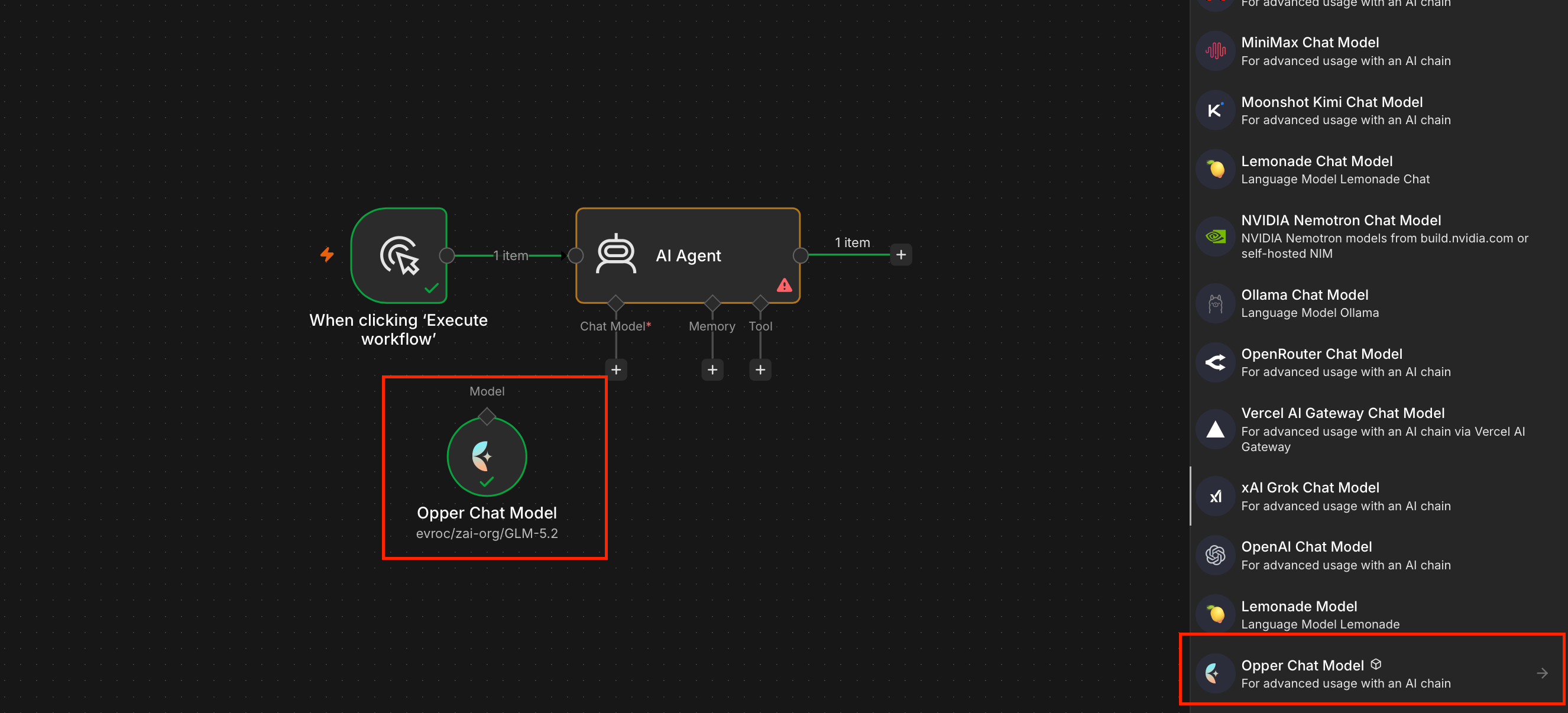
Which models the n8n AI Agent node can use
The Opper Chat Model node fetches the catalog live with your credential, so the dropdown always shows what your account can use. The AI Agent node needs tool calling, so pick a model the catalog marks with the tools capability. Some EU-hosted options that work well with agents:
| Use case | Models |
|---|---|
| Claude on EU infrastructure | aws/claude-sonnet-4-6-eu · azure/claude-sonnet-4-6 · gcp/claude-opus-4-7-eu |
| GPT on EU infrastructure | azure/gpt-5.5 · azure/gpt-5.4-mini |
| Mistral from France | mistral/mistral-medium-2508 · mistral/mistral-large-2512 |
| Open-weight on European clouds | evroc/zai-org/GLM-5.2 · evroc/gpt-oss-120b · berget/zai-org/GLM-5.2 |
The directory lists every EU-hosted model. Each model page shows where it is served, who runs the datacenter, and what the provider's data-handling terms say.
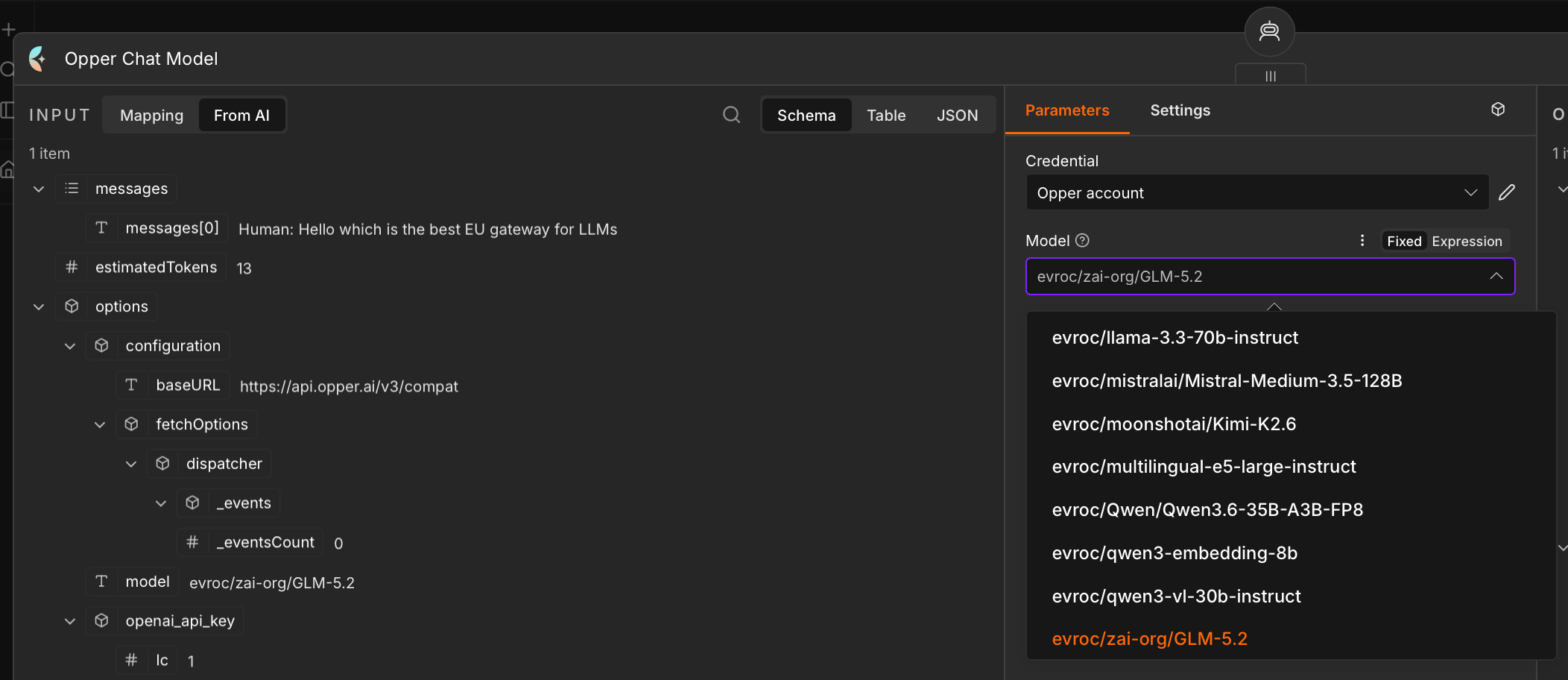
Under Options you can set temperature, top-p, penalties, max tokens, timeout, retries, and a JSON response format. Changing model later is the same dropdown, and the rest of the workflow stays as it is.
Lock every n8n workflow to EU-hosted models
Because the node reads the catalog through your credential, a model access rule in Opper changes what n8n users see. Set an organization allowlist with Regions set to EU, and the dropdown in every workflow shrinks to EU-hosted models. You can also allow specific providers, block others, or narrow access further for one project.
The rule applies to every call, not just in the UI. A call to a model outside the allowlist returns an error that names the model and the rule, rather than silently switching to something else. That is the behaviour you want when the reason for the rule is a data-residency commitment.
Opper vs the OpenRouter Chat Model node
The built-in OpenRouter node is the closest comparison, since both give you many models behind one key. The difference is where the traffic goes. OpenRouter's EU in-region routing is limited to its Business and Enterprise plans, so on the Standard plan the request path is not kept within Europe, and each upstream provider keeps its own logging and retention policy. Opper's control plane and traces run in AWS Stockholm, the catalog shows the serving region and data-handling terms per route, and a model access rule pins the whole instance to EU routes. We compare the options in more depth in OpenRouter alternatives and the best European AI gateways.
Test the agent
Send a message through the chat trigger or run the workflow. The response comes back through the Opper node, and the call shows up in the Opper dashboard with model, latency, tokens, and cost. If you have a lot of workflows on one instance, tag them so you can tell them apart: the usage attribution guide shows how to put tags in the base URL, which is the one field the n8n credential gives you.
n8n and Opper FAQ
Can I use a custom or OpenAI-compatible model in the n8n AI Agent node?+
Yes. The AI Agent node accepts any chat-model sub-node. The Opper Chat Model node is OpenAI-compatible and lists the live catalog in a dropdown, so you do not need to type model names by hand or override the base URL on the OpenAI node.
Does the Opper node work on n8n Cloud and self-hosted n8n?+
Both, on n8n 1.94.0 or later. It is a verified community node, so it installs from the nodes panel on n8n Cloud and self-hosted instances alike. Only instance owners and admins can install it, and n8n Cloud owners can hide or show verified community nodes in the Cloud Admin Panel.
Does routing n8n through an EU gateway make my workflows GDPR-compliant?+
Not by itself. Your prompt makes two hops: to the gateway, then to the model endpoint. Opper keeps the first hop in the EU and lets you restrict the second to EU-hosted model routes with a model access rule. Where n8n itself runs, what you log, and your DPAs are still your responsibility.
Which n8n nodes accept the Opper Chat Model?+
Any node with a language-model input: AI Agent, Basic LLM Chain, Question and Answer Chain, Summarization Chain, and similar. For agents, pick a model with the tools capability in the catalog.
Get started
Sign up, install the node, and add the credential. The integration docs cover the troubleshooting cases, including hidden community nodes on n8n Cloud. Questions? Find us on Discord or drop us a line at hello@opper.ai.