How to run Claude Cowork with third-party inference providers
By Göran Sandahl -
If you're using Claude Cowork today, it's talking directly to Anthropic, and most of the time that works perfectly well. There are moments, though, where a little more control is helpful. When legal asks where the inference is actually happening, and you'd like to give them a confident answer. When Anthropic is rate-limiting and work stalls. When your team is burning through Opus tokens on a task a smaller model could have handled just as well.
Claude Cowork now supports third-party inference, which means you can route it through any gateway that speaks the Anthropic Messages API — OpenRouter, a LiteLLM proxy you run yourself, or Opper. The setup is the same in each case: three fields in Cowork's Developer-mode dialog.
Why connect Claude Cowork to a third-party inference provider
Pointing Cowork at a gateway buys you three things that come up a lot in these conversations:
- EU residency and data locality. A gateway's catalog tells you where each model is deployed, so you can pin your traffic to EU-hosted models when inference needs to stay in Europe.
- Fallbacks across providers. The same model — Claude Sonnet, for example — is available from multiple upstreams. If one rate-limits or goes down, the gateway falls back to the next without interrupting the session.
- Lower cost when a frontier model isn't needed. For routine work, choose a lower-cost Claude model that meets your needs. The Cowork interface stays the same.
Below is the setup using Opper.
Configure Claude Cowork third-party inference in three steps
1. Enable Developer mode
In Claude Cowork's Help menu, click Enable Developer Mode, then quit and restart the app. A new Developer menu appears in the menu bar.
2. Open the third-party inference dialog
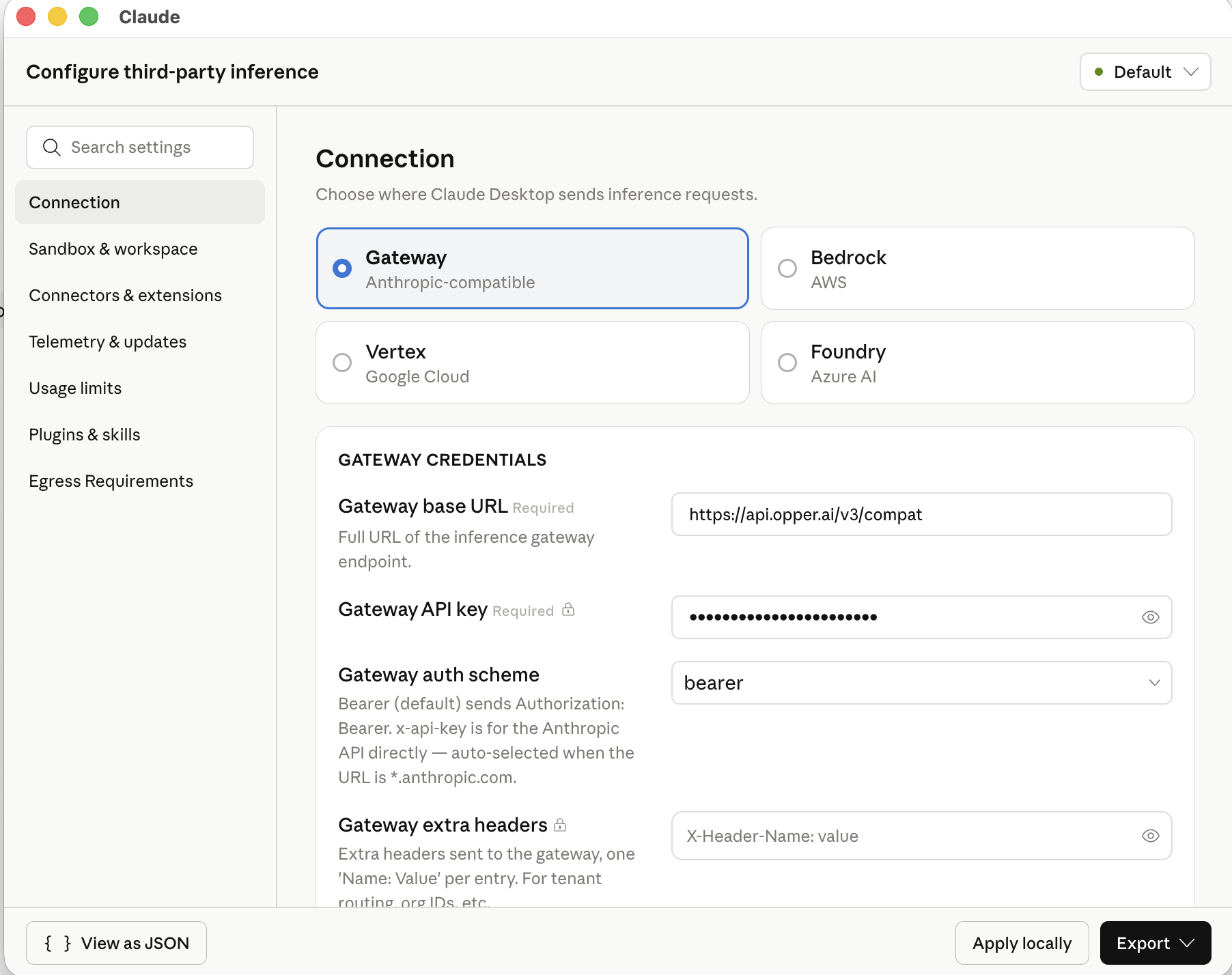
From the Developer menu, choose Configure Third-party inference. In the dialog that opens, choose Gateway (Anthropic-compatible).
3. Add your gateway
Fill in three fields:
| Field | Value |
|---|---|
| Gateway base URL | https://api.opper.ai/v3/compat |
| Gateway API key | Your Opper API key. You can grab one at opper.ai |
| Gateway auth scheme | bearer |
Click Apply locally if you just want to try it on your own machine, or Export to ship the same configuration as an MDM profile (.mobileconfig for macOS, .reg for Windows) for a team-wide rollout.
Add Claude models to your Opper gateway
Use Anthropic models with Cowork. A third-party gateway changes where Claude inference is served; it does not make GPT, DeepSeek, or other model families supported in Cowork. For models from multiple makers, use Codex through the Opper CLI.
The gateway only exposes models you've added to your Opper project, so before you can pick them in Cowork you'll want to add a few. The Models page has the full catalog and the exact identifiers, and you can add them from the Opper dashboard. A reasonable starting set:
| Use case | Models |
|---|---|
| Claude Sonnet across major clouds | aws/claude-sonnet-4-6-eu · azure/claude-sonnet-4-6 · gcp/claude-sonnet-4-5-eu |
| Claude Opus when you need it | aws/claude-opus-4-7 · azure/claude-opus-4-7 · gcp/claude-opus-4-7-eu |
Once you've added a model on the Opper side, it shows up in the Cowork picker on your next conversation.
Verify the gateway connection
Send any message in Cowork. The status indicator at the bottom-left should now read Cowork 3P | Gateway — that's how you know the request was routed through Opper rather than going to Anthropic directly.
From there, the Opper dashboard is where you:
- Set per-project spend caps
- Configure guardrails
- Pin region or provider policies
- Optionally turn on logging for traces with
model,latency,tokens, and full request/response
Switch models mid-session
Once the gateway is wired up, use the Cowork model picker to select an available Claude model.
Here's what a typical session might look like:
- You're working on something that touches customer data, so you start on
gcp/claude-sonnet-4-5-eu. That's Claude served from GCP Vertex, kept inside the EU. - For routine work, stay on a Claude model that fits your budget and provider policy.
- An hour in, you hit a hard problem. Jump to
aws/claude-opus-4-7for a prompt or two, then drop back down to where you were.
It's all the same Cowork window and the same chat history, just with different routing happening under the hood. If you've turned on logging, you can also go back later and see where spend went, which provider served what, and whether anything ever strayed outside your policy.
Get started
If Opper fits — EU hosting, control plane, traces — sign up, set the three fields above, and add a couple of models from the catalog. The same flow works with the gateways listed up top. Questions? Find us on Discord or drop us a line at hello@opper.ai.