Reference images, first and last frames in new video models
By Jose Sabater -
Video models have improved a lot recently, in my opinion the killer feature are references: you can hand them a reference image and ask them to carry that subject into the clip.
It also makes them comparable, which they normally aren't. Judging a handful of clips grown from different prompts tells you almost nothing. Give several models the same picture and the same sentence and the differences are actually about the models.
Since we have been adding a lot of new image models recently, including the new Open Source MiniMax H3 I wanted to see how they compare to my personal favorite until today Gemini Omni Flash.
So I gave MiniMax H3 (the third Hailuo generation), Grok Imagine Video 1.5, Gemini Omni Flash and Wan 2.7 an ice-cream van and watched what came back. Then I pushed on two ideas that go further: two characters instead of one, and specifying where a clip ends instead of describing it.
Everything below was generated on Opper, most of it by clicking around Media Studio, all of it reproducible with one API call. Same key, same request shape, whether the model on the other end makes text, images or video, which is the part of a multimodal gateway that makes a comparison like this cheap to run at all.
One picture, four models
I started with a deliberately fussy subject. A striped awning, a soft-serve cone bolted to the roof, red script lettering, whitewall tyres, a price board. Plenty for a video model to get wrong.
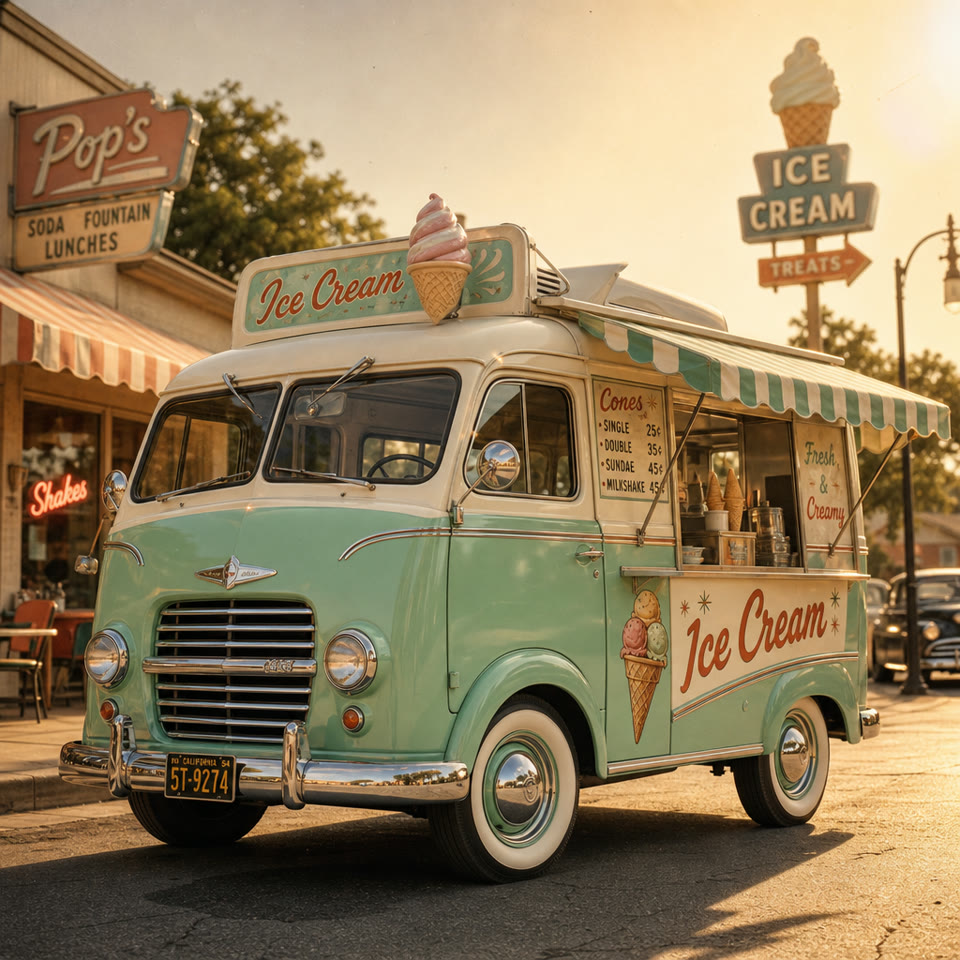
That came from openai/gpt-image-2, one image generation call on the same API, prompted with:
A charming retro ice-cream van painted in soft mint-green with cream-white trim, parked at a slight three-quarter angle so both its curved front grille and serving-hatch side are visible, its striped awning extended and a cheerful hand-painted sign reading "Ice Cream" above the counter, whitewall tires and chrome bumpers gleaming, set against a nostalgic sunlit street scene with warm golden-hour light casting long soft shadows and a gentle lens flare, rendered in a vintage 1950s illustrative style with clean rounded shapes, subtle film-grain texture, and a warm pastel colour palette of mint, cream, and soft coral accents, captured in medium-wide composition with the van centered and slightly low camera angle to emphasize its friendly, rounded silhouette, fine details visible in the chrome trim, painted signage, and textured awning stripes.
Then the same video prompt went to every model, unchanged:
The mint-green ice-cream van from the reference is parked on the sand at the top of a beach in late afternoon light. The camera pulls back slowly and widens to reveal children running up from the shoreline toward the serving window, kicking up sand as they go. Warm golden-hour light, gentle sea breeze, long shadows. Audio: a traditional ice-cream van chime melody, children laughing and calling out, waves breaking and distant seagulls.
MiniMax H3
Grok Imagine Video 1.5
Gemini Omni Flash
Wan 2.7
All four kept the van. The mint green, the striped awning, the roof cone, the whitewalls and the general 1950s shape survive everywhere. That's the whole point of a reference image, and it works.
Text is where they came apart. The reference has "Ice Cream" in red script and a legible price board. H3 held the script best. Omni rendered it as "Ice-ice Cream". Grok, at 480p, drifted furthest, to something closer to "Tones & Cream", with the price board reduced to mush. Treat a reference image as carrying shape and colour, not lettering, at least not always. In my experience Omni has generally worked really well carrying over text from images, just not this time.
They disagreed about the camera. The prompt asked to pull back and widen. H3 and Omni did. Grok did the opposite: it opens wide with the van small against the surf and pushes in, finishing at the serving window with the children gathered round. It's a great shot. It's just not the one I asked for.
Wan 2.7 told a story instead of taking a shot. The prompt describes one continuous move. Wan cut it into three. On top of that the audio and character vibes feel more from a horror movie than a wholesome icecream at the beach day.
One more thing worth noticing: there's no audio parameter anywhere in that request. The soundtrack is directed in the same sentence as the picture, by the Audio: clause at the end of the prompt, and all of them came back with a stereo track off the back of it, remember to mention in your prompt what the audio should be!
Two characters and a shot list
If one reference works, two should. And if a model is following a description that closely, would it follow a structure?
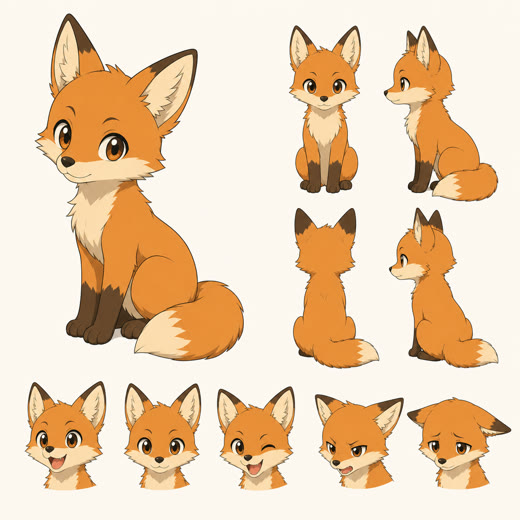
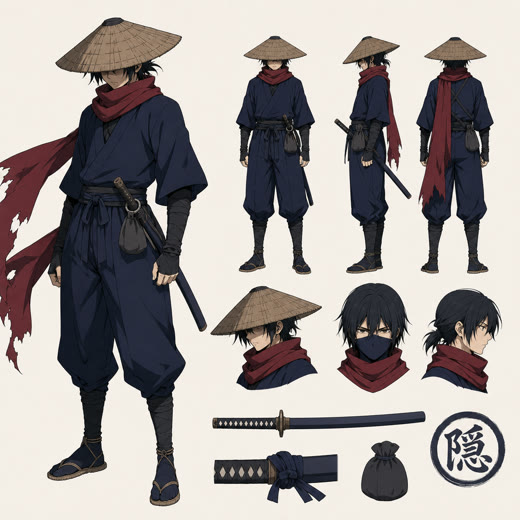
So I drew two characters and wrote the prompt as a shot list.
Anime short, warm cel-shaded style, summer festival at night.
Shot 1: Close on the fox cub (Image 1) perched on a tiled rooftop, ears twitching, paper lanterns glowing below, cicadas loud.
Shot 2: Wide shot, the ninja (Image 2) leaps between rooftops above a lantern-lit festival street, the fox cub running alongside, scarf streaming behind.
Shot 3: Both land on a ridge tile and turn to look up as a firework bursts over the festival, silhouetted against the light.
Audio: cicadas, distant taiko drums and festival crowd, the whistle and rolling boom of a firework.
The (Image 1) and (Image 2) are there because H3 asks you to cite reference assets by their order. Grok and Omni have no such convention, so the parenthetical was a small bet that they would read past it. None of them drew the text into the picture, so the bet paid off and one prompt covered every model.
MiniMax H3
Grok Imagine Video 1.5
Gemini Omni Flash
Wan 2.7
All four followed the shot instructions, cutting between the three shots as written. Wan 2.7 was the cleanest of them: fox on the tiles under the lanterns, then the ninja mid-leap with the cub running alongside and the scarf streaming, then both from behind as the firework opens.
Quality wise for this specific manga-like scene, the best is H3 -> Grok -> Omni in my opinion, maybe Omni has excellent quality of the characters, but the physics are not that good.
Two references held as well as one. The fox stayed orange with its cream chest, the ninja stayed indigo with the crimson scarf and the straw kasa hat.
Style matters more than resolution. The van at 480p lost its lettering and its chrome. The anime at 480p barely suffers, because flat cel shading has no fine detail to lose. Grok produced the cheapest clip here by a wide margin and it holds up next to the others. If your output is stylised, the cheap tier goes a lot further than it does on photoreal.
Telling it where to end
The third idea is different. Instead of describing the ending, you supply it. MiniMax H3 takes both a first and a last frame, sometimes called start and end frame control, and invents the transition between them. And I compare it to Kling 3.0, which we have served for a while now.
The trick is that the two stills have to share everything except the thing you want to change. So I generated the start frame, then made the end frame by editing it rather than generating a second image from scratch:
Keep the composition, camera position, lens and framing exactly the same, and keep the same four people dancing in the same places on the deck. Change only the time of day to night: the sky deep blue with a last low band of orange at the horizon, the strings of festoon bulbs now lit and glowing warm gold, their light falling across the planks and the dancers, warm reflections shimmering on the dark water, palms silhouetted against the night sky.
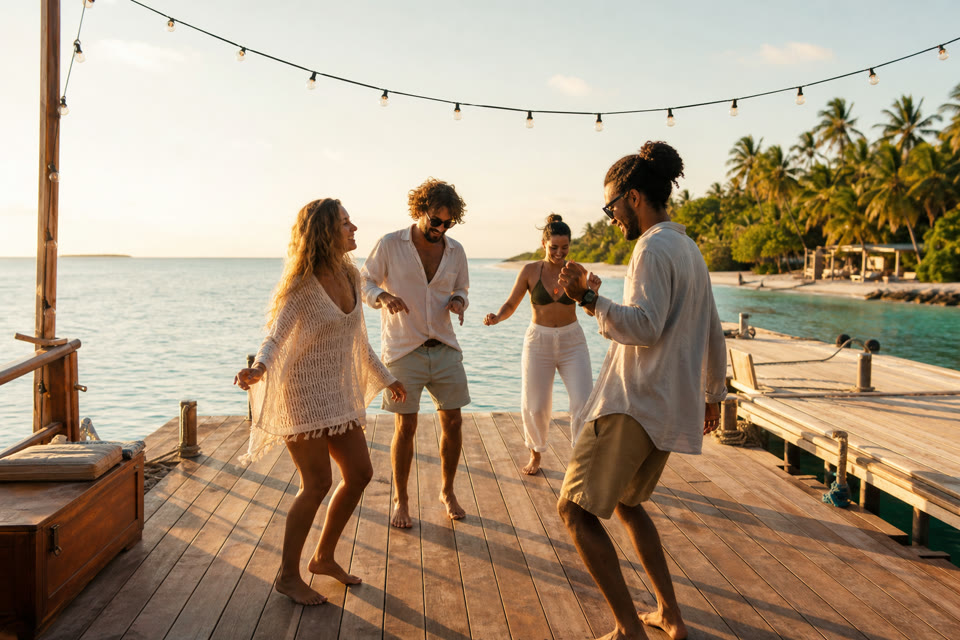
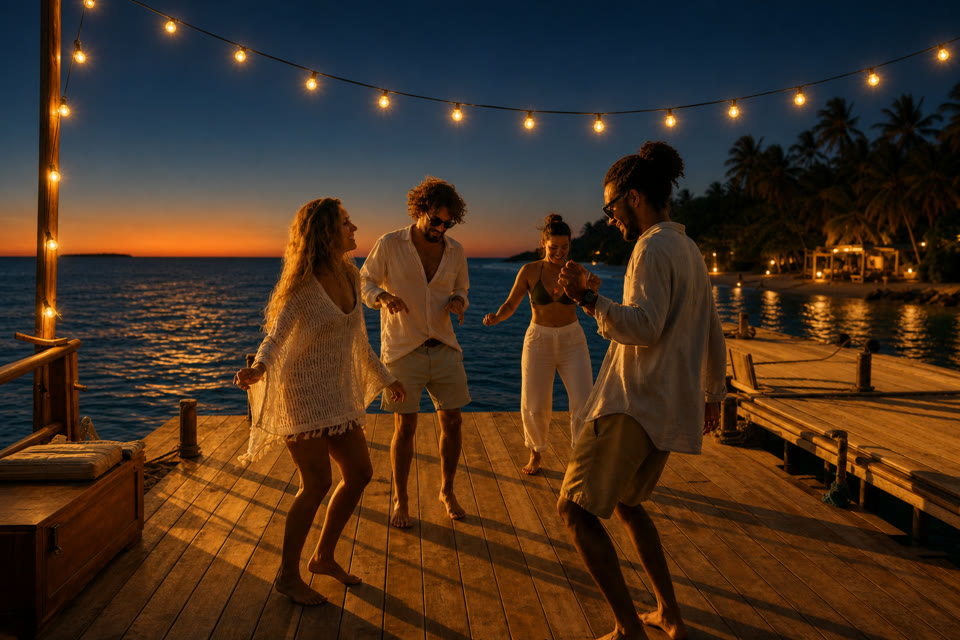
Same four dancers, same poses, same jetty, same lens. Only the light moved. Then both frames went to H3 with a prompt describing the journey between them:
An evening on the water unfolds in a few seconds. The sun drops below the horizon, the sky deepens from gold to blue, and the strings of festoon bulbs flicker on and glow warm above the deck. The dancers keep moving, picking up the tempo as the light changes, warm reflections shimmering across the water. The camera holds steady. Audio: acoustic guitar and hand percussion, laughter and clapping, water lapping against the hull, a soft evening breeze.
Kling 3.0 takes the same two frames, so the same pair goes to it unchanged:
It reads as a time-lapse rather than a cross-fade. The light walks the whole way from golden hour to lit bulbs while the dancers keep moving and the camera stays put.
Kling gets to the same place. The light walks from golden hour to lit bulbs and the final frame lands on the end still, dancers and jetty intact. What it does less well is the people: the movement is completely stiff and unnatural stiffer, closer to figures being posed through the transition than to anyone actually dancing.
Edit the start frame, don't generate a second one. That's the whole trick. Two independent generations differ in a dozen small ways, in horizon height, in lens, in where people are standing, and the model burns the clip reconciling them instead of doing the transition you actually wanted.
The stills decide the shape. Image-to-video derives its aspect ratio from the source frame. Mine were 1536x1024, so the video came out 2176x1440 rather than a 16:9 2K frame. If you want a particular shape, set it on the images.
Doing it yourself
In Media Studio this is all clicking. Switch to Video, pick a model, drop an image into the References slot, type the prompt, generate. Swapping models keeps your inputs, which is what makes a fair side-by-side cheap. The last-frame slot appears once you attach a first frame.
In code it's one request. Video generation is asynchronous, so you get a status_url back immediately and poll it:
curl https://api.opper.ai/v3/videos \
  -H "Authorization: Bearer $OPPER_API_KEY" \
  -H "Content-Type: application/json" \
  -d '{
    "model": "fal/minimax-h3",
    "prompt": "The mint-green ice-cream van from the reference is parked on the sand ...",
    "reference_images": ["https://example.com/reference.jpg"],
    "resolution": "2K",
    "parameters": { "duration": 5 }
  }'
{ "id": "gen_...", "status_url": "https://api.opper.ai/v3/artifacts/gen_.../status" }
Poll until it reports completed and you get a download URL, the billed cost, and a reusable file_id:
import os, time, requests

OPPER = "https://api.opper.ai/v3"
headers = {"Authorization": f"Bearer {os.environ['OPPER_API_KEY']}"}

job = requests.post(f"{OPPER}/videos", headers=headers, json={
    "model": "fal/minimax-h3",
    "prompt": PROMPT,
    "image": "file_...",        # first frame
    "last_image": "file_...",   # last frame
    "resolution": "2K",
    "parameters": {"duration": 10},
}).json()

while True:
    status = requests.get(f"{OPPER}/artifacts/{job['id']}/status", headers=headers).json()
    if status["status"] in ("completed", "failed"):
        break
    time.sleep(5)

print(status["url"], status["usage"])   # {'cost': 2.6, 'seconds': 10}
Switching models is the model field and nothing else. Same reference images, same prompt, same polling:
for model in ["fal/minimax-h3", "xai/grok-imagine-video-1.5", "gemini/gemini-omni-flash-preview"]:
    ...
reference_images, image and last_image all accept a public URL, a data URI, or a file_<id> from /v3/files. Generate an image, keep the file_id, feed it to every model without re-uploading.
What I'd keep
| MiniMax H3 | Grok Imagine Video 1.5 | Gemini Omni Flash | Wan 2.7 | Kling 3.0 Pro | |
|---|---|---|---|---|---|
| Model id | fal/minimax-h3 | xai/grok-imagine-video-1.5 | gemini/gemini-omni-flash-preview | fal/wan2.7 | fal/kling-3.0-pro |
| Resolution | 768p, 2K | 480p, 720p, 1080p | 720p | 720p, 1080p | 1080p |
| Length | 5 to 15s | 1 to 15s | picks its own, up to 10s | 2 to 15s | 3 to 15s |
| Reference images | yes | yes | yes | yes, multi-subject | via elements |
| First and last frame | yes | no | no | yes | yes |
| Video in (edit) | no | no | yes | continue a clip | no |
| Audio | native stereo, always on | yes | yes | yes | yes, on by default |
| Price | $0.18/s at 768p, $0.26/s at 2K | $0.08, $0.14, $0.25 per second | $0.10/s | $0.10/s at 720p, $0.15/s at 1080p | $0.112/s silent, $0.168/s with audio |
Speed is worth planning around. Grok came back in roughly 25 seconds. Omni took 40 to 60. H3 took 209 seconds for a 5 second clip and 292 for a 15 second one, though part of that is queue rather than render, so it moves with load. Single runs, not a benchmark, but the ordering held every time I looked. None of them are interactive, which is why the API hands back a status_url instead of blocking.
If I had to pick: Grok for iterating, because 480p at $0.08/s is cheap enough to try ten prompts before committing, and stylised output barely suffers for it. H3 for the final take, because it holds detail best, and because first-and-last-frame is a kind of control the others just don't offer. Omni when you want a longer clip without thinking about it, or when you need to edit an existing video rather than generate a new one.
All three are on one API key, next to the text, image generation and transcription models on the same multimodal router. Sign up and the model ids above are the only thing that changes between them.